
Bakin DLsite Game Version Checker
A downloadable Bakin plugin
This RPG Developer Bakin plugin lets you check for the latest version of your game hosted on DLsite, and can return both the version number and a switch value of true/false if there is a new version available. It's got descriptions in both English and Japanese (DeepL).
このRPG Developer Bakinプラグインを使用すると、DLsiteでホストされているゲームの最新バージョンをチェックすることができ、バージョン番号と、新しいバージョンが利用可能な場合はtrue/falseのスイッチ値の両方を返すことができます。英語と日本語(DeepL)の両方の説明があります。
Addon Usage | アドオンの使用
EN
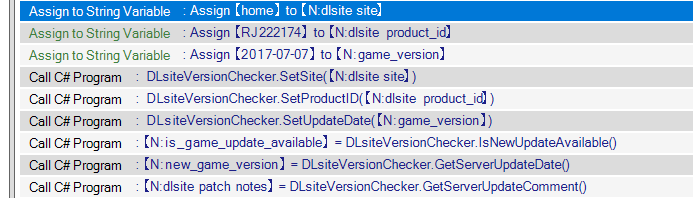
Ideally, add the plugin to a common event, then define four different string variable boxes for the user, game, build and version, then call SetSite, SetProductID, and SetUpdateDate.
- site: The DLsite "site", or which section of the website the game belongs on. You can find a list of sites on the home page of DLsite. For doujin non-R18 games for example, it's most likely going to be https://www.dlsite.com/home/, so the word you put will be home. For doujin R18 games, it'll be maniax, etc...
- product_id: The product page ID. For example, if your game page is https://www.dlsite.com/home/work/=/product_id/RJ222174.html/, the product ID will be RJ222174.
- update_date: This will act as your game version number, since DLsite only shows updates with a date instead of a version number. When compiling your game, you should be ready to publish your update on the same day as the date of you've defined on here. It can be formatted in three different ways, as the plugin will convert both the server date and stored date into a single format:
- In a standard format: YYYY-MM-DD (ex: 2018-07-07)
- In Japanese, in the same format as DLsite: YYYY年MM月DD日 (e.g., '2018年07月07日')
- Or in English, in the same format as DLsite: MMM/DD/YYYY (e.g., 'Jul/07/2018')
When all three are defined, you can then use both IsNewUpdateAvailable() (returns true if it finds a different version on the servers) and GetServerUpdateDate() (returns the string value of the version on the DLsite servers).
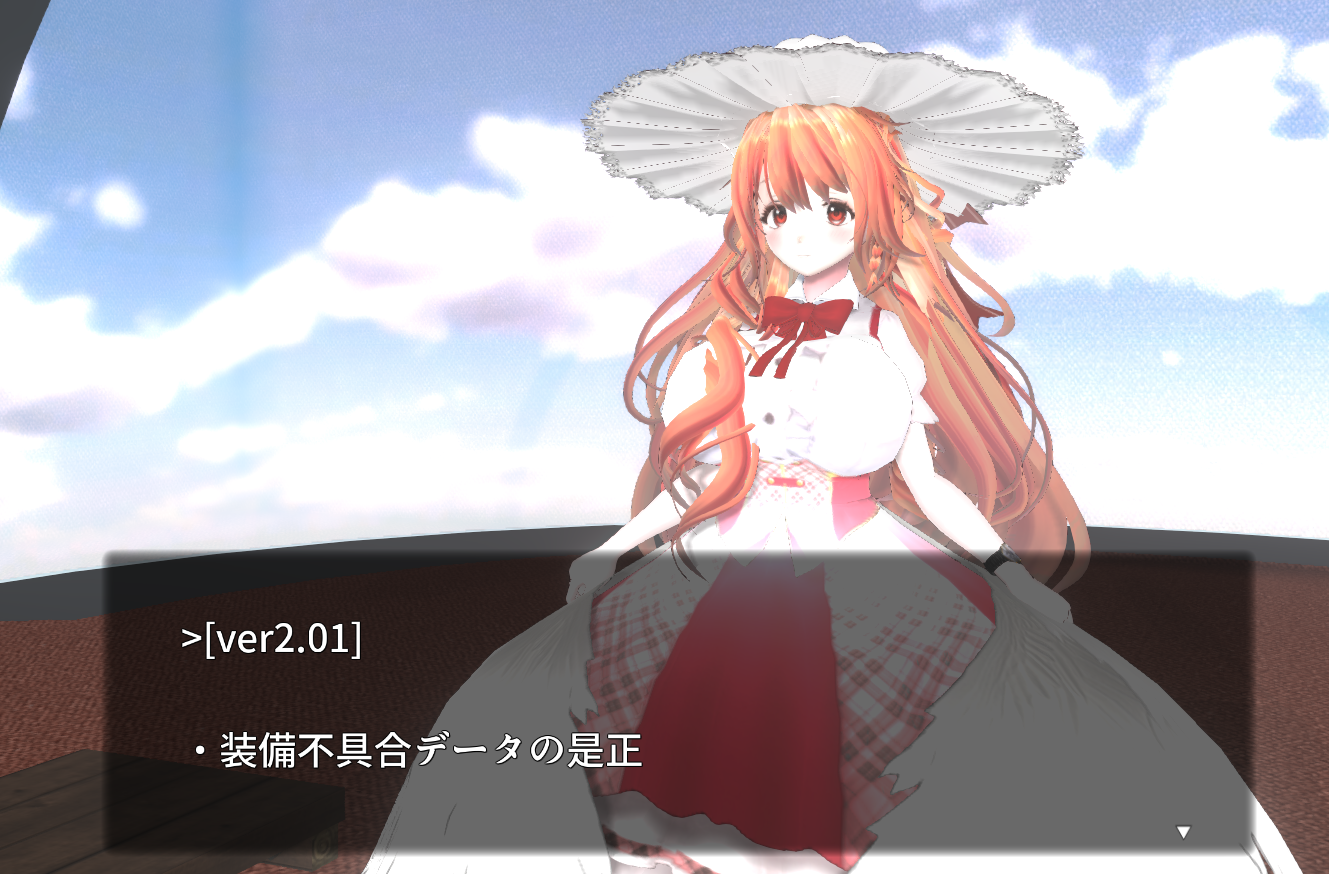
Additionally, you can use GetServerUpdateComment() to obtain the description of the update as a string!
Recommendations
- Ideally, it's worth making a separate common event just for defining the string variable boxes called "Game Build Information", then calling it in your common event that does the update check.
- This will make it easier to isolate the area of the game code you need to modify to define new versions of your game, keeps your code cleaner, etc...
- Store the game version as both string variable box that gets saved with save files and as a cross-save string variable box, and run a common event to define the game version to both at the start of the game when launched.
- In the future, this will allow you to create common events that can issue game patches if it detects that your game save was last used in an older version, and then do checks and fixes based on your needs (ex: fixing a game breaking bug after a save).
JP
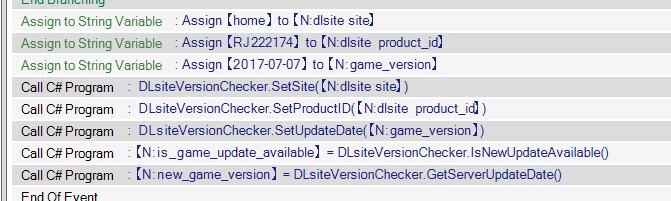
理想的には、共通イベントにプラグインを追加し、ユーザー、ゲーム、ビルド、バージョンの4つの異なる文字列変数ボックスを定義し、SetSite、SetProductID、SetUpdateDateを呼び出します。
- サイト: DLsiteの「サイト」、つまりゲームがウェブサイトのどのセクションに属しているか。DLsiteのトップページにサイトのリストがあります。例えば、R18以外の同人ゲームの場合、https://www.dlsite.com/home/、homeとなります。同人R18ゲームならmaniaxなど。
- product_id: 商品ページのID。例えば、ゲームページが https://www.dlsite.com/home/work/=/product_id/RJ222174.html/ の場合、プロダクトIDは RJ222174 となります。
- update_date:DLsiteではバージョン番号の代わりに日付でしかアップデートを表示しないため、これがゲームのバージョン番号として機能します。ゲームをコンパイルする際には、ここで定義した日付と同じ日にアップデートを公開できるようにしてください。このプラグインは、サーバーの日付と保存されている日付の両方を単一のフォーマットに変換するため、3つの異なる方法でフォーマットすることができます:
- 標準的なフォーマットで: YYYY-MM-DD (ex: 2018-07-07)
- DLsiteと同じ形式の日本語版:YYYY年MM月DD日 (e.g., '2018年07月07日')
- または英語で、DLsiteと同じフォーマットで: MMM/DD/YYYY (e.g., 'Jul/07/2018')
この3つが定義されたら、IsNewUpdateAvailable() (サーバー上で異なるバージョンを見つけたらtrueを返す)とGetServerUpdateDate() (DLsiteサーバー上のバージョンの文字列値を返す)の両方を使用できます。
さらに、GetServerUpdateComment() を使用して、更新の説明を文字列として取得できます!
推薦の言葉
- 理想的には、"Game Build Information "という文字列変数ボックスを定義するためだけのコモンイベントを別に作り、更新チェックを行うコモンイベントの中でそれを呼び出す価値がある。
- こうすることで、新しいバージョンのゲームを定義するために修正する必要のあるゲームコードの領域を簡単に分離でき、コードをすっきりさせることができる。
- ゲームバージョンを、セーブファイルと共に保存される文字列変数ボックスと、クロスセーブ文字列変数ボックスの両方として保存し、起動時にゲームバージョンを両方に定義する共通イベントを実行する。
- 将来的には、ゲームのセーブが古いバージョンで最後に使用されたことを検出した場合、ゲームパッチを発行し、必要に応じてチェックや修正を行うことができる共通のイベントを作成できるようになります(例:セーブ後にゲームを壊すバグを修正する)。
Special thanks to the https://github.com/bhrevol/dlsite-async project for insights on getting DLsite information.
Download
Click download now to get access to the following files:
Development log
- DLsite Version Checker release!Aug 28, 2025
Leave a comment
Log in with itch.io to leave a comment.